Image & Video / all software

In development · early access

Scout

Find what moves in CCTV

Stop scrubbing through hours of footage. Scout works through a folder of exports, or just the clips you pick, and lays every clip out on an activity timeline so you can jump straight to the moments worth watching.

Scout from start to finish: four cameras and almost six hours of footage, from opening the folder to the report. Synthetic demo footage; analysis shown sped up.

The problem it solves

Reviewing CCTV means watching hours of nothing to find the seconds that matter, and simple motion detection drowns you in shadows, IR switching and headlights. Scout filters out what doesn't matter, names what it found, and shows you where in each clip to look.

Who it's for: Investigators and CCTV officers reviewing footage from many cameras or long recording periods.

What it does

  • Motion that ignores noise. Shadows, IR switching, lights coming on and knocked cameras are filtered out. One choice of Quick, Balanced or Thorough sets how carefully it looks.
  • Object detection. People, vehicles, bags, animals and weapons, with an optional extra model for firearms.
  • Watch and ignore zones. Draw a box over a doorway to focus on it, or over the burned-in clock, trees and busy roads to mute them.
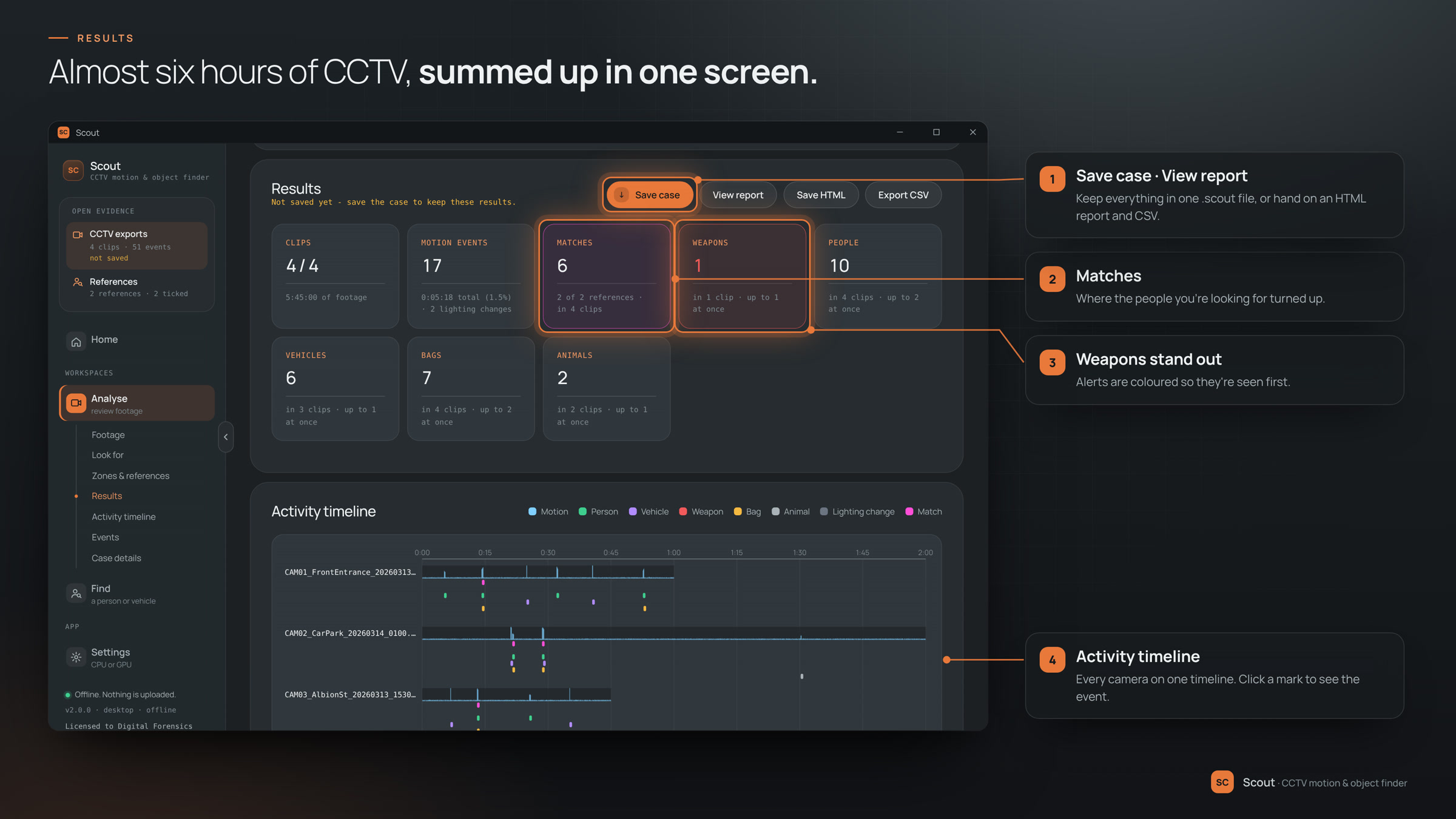
  • Activity timeline. Every clip on a timeline with a motion heatmap, and an event list with the best frame, time, length and confidence of each event.
  • Find someone from a photo. Add a still, or pick someone out of a detection, and Scout searches every clip for them, closest matches first.
  • Cases and reports. Save results to one case file and pick up later. Export a self-contained HTML report with snapshots, and a CSV of every event.

See it work

what to click, and what you get

01 · Analyse

Point it at the exports. Scout watches every hour.

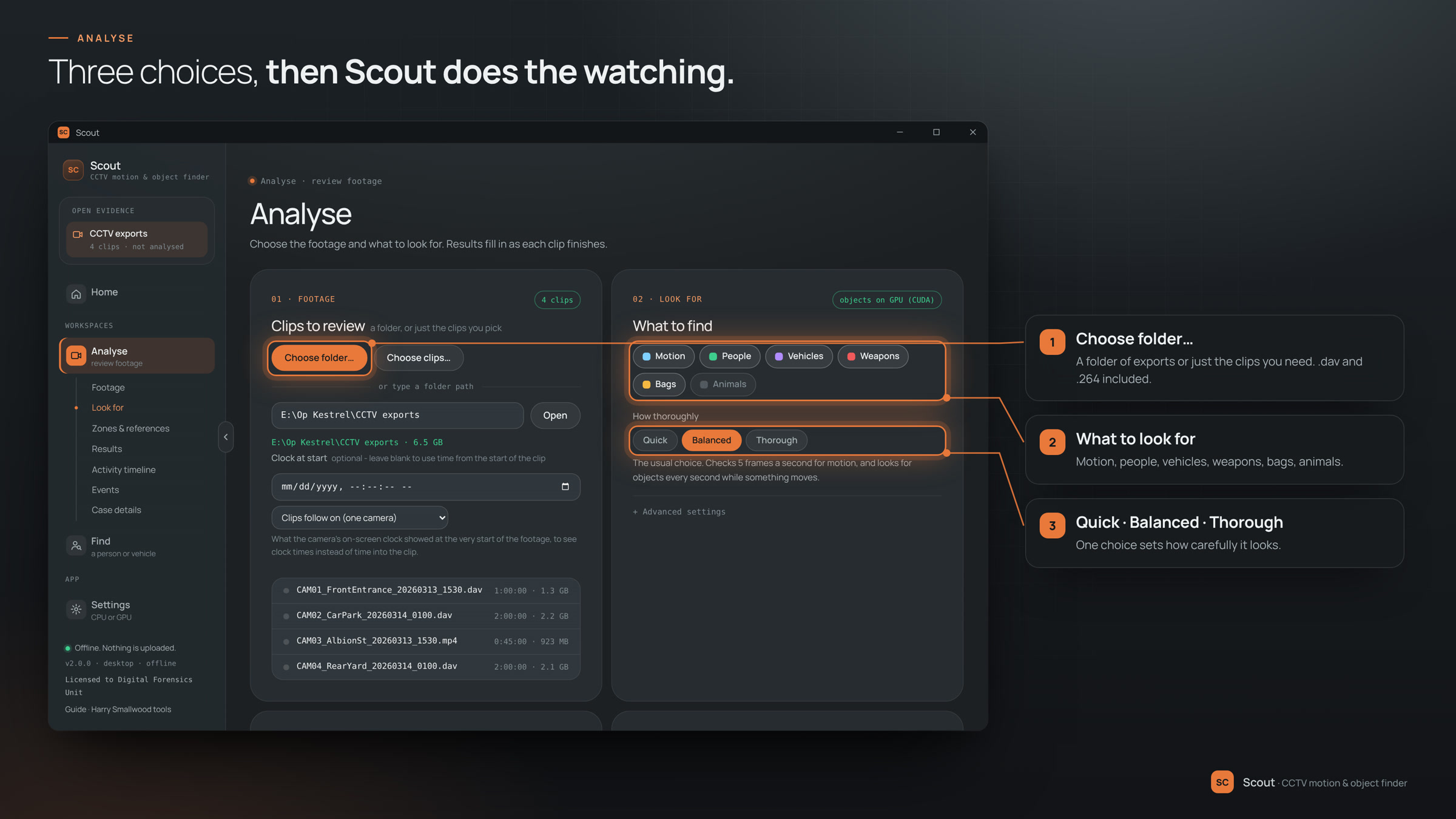
Open a folder of DVR exports, say what you're looking for, and press Analyse. Scout works through every clip on the machine itself and fills in the results as each one finishes.

  1. Choose a folder… a whole folder of exports, or just the clips you need. .dav and .264 included.
  2. Tick what to look for motion, people, vehicles, weapons, bags and animals.
  3. Quick, Balanced or Thorough one choice sets how carefully it looks.
  4. Analyse every clip is counted up on one results screen, weapons first.
02 · Review

Skip the hours of nothing. Jump to what matters.

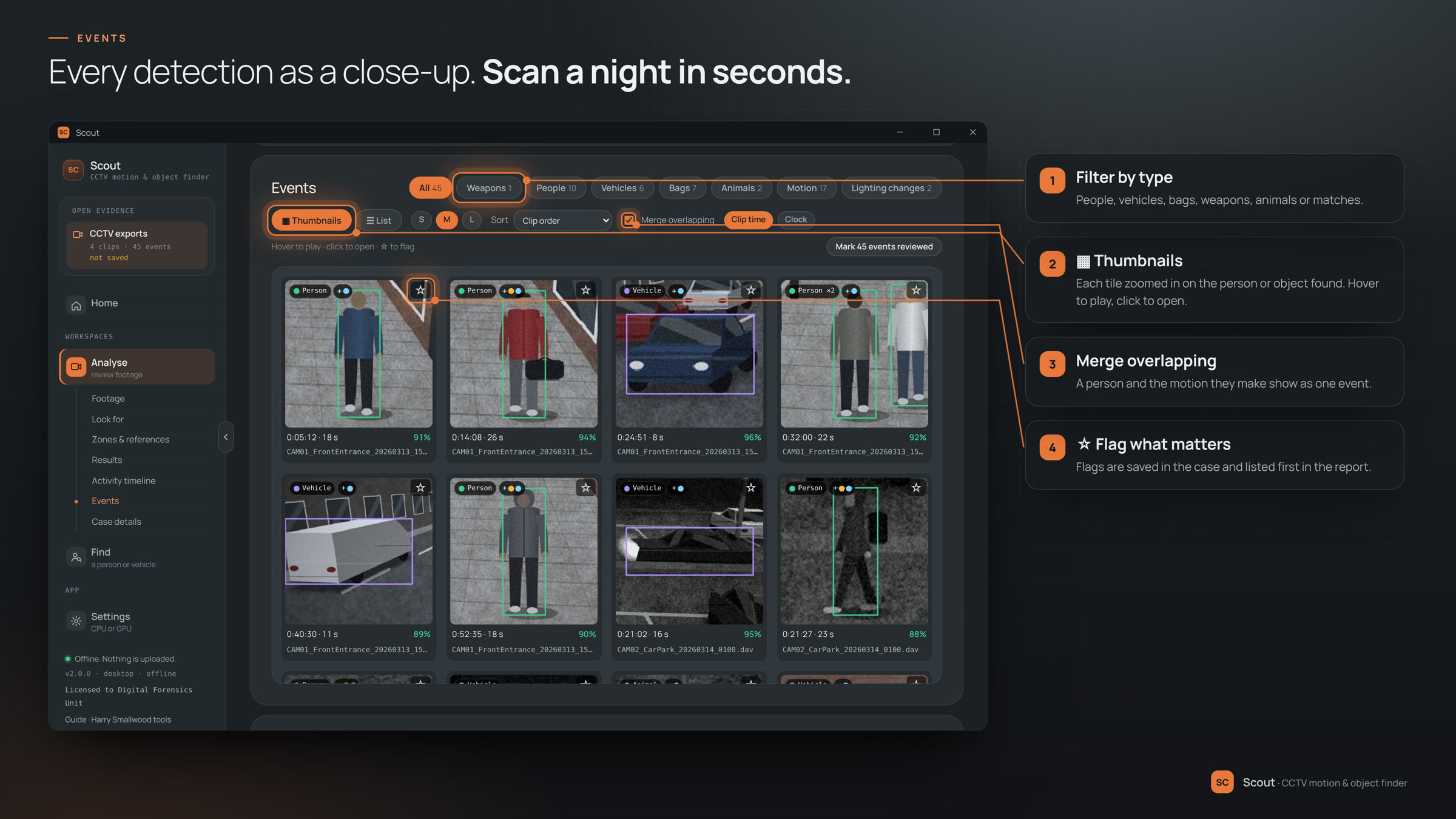
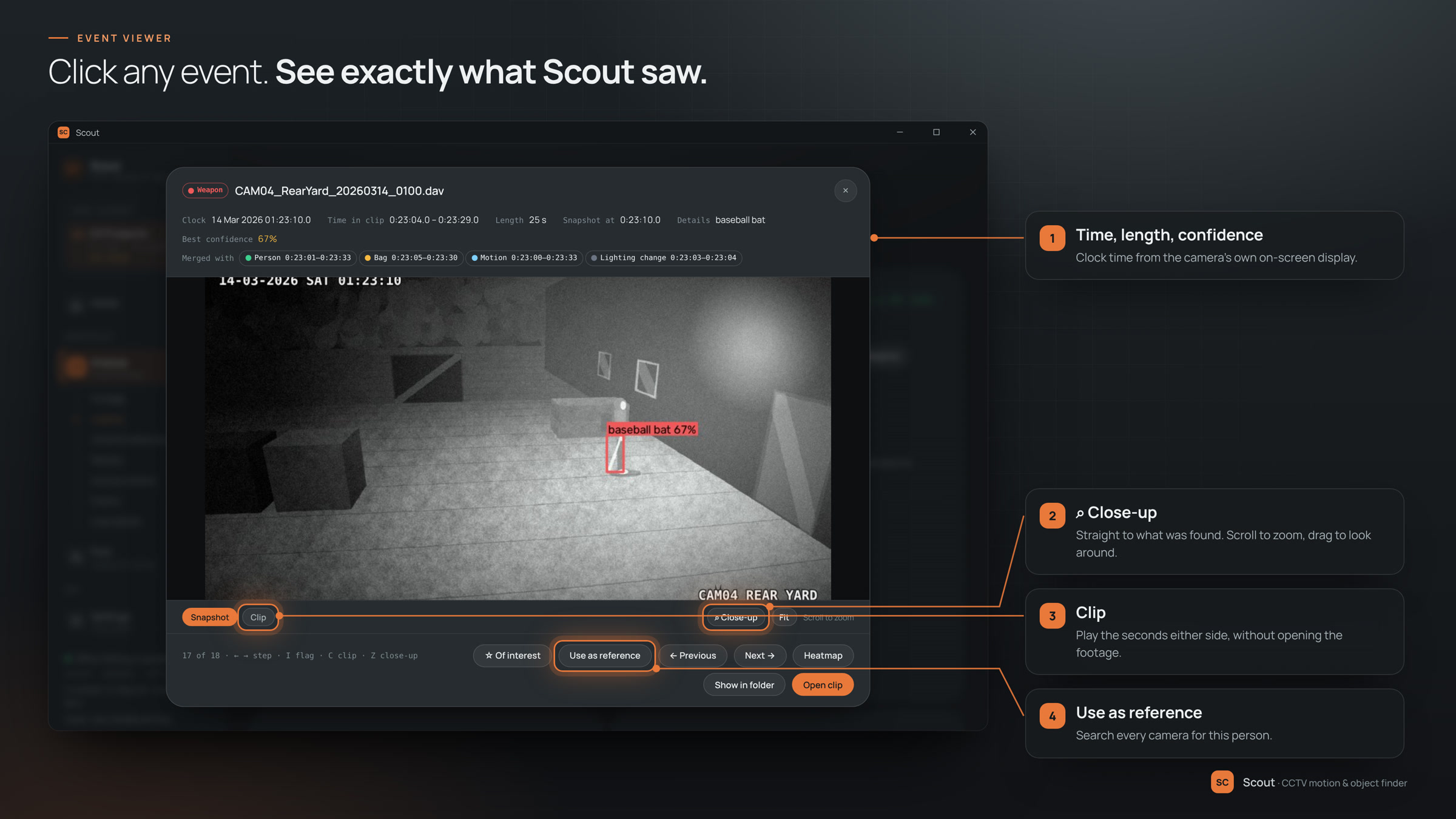
Every camera sits on one activity timeline. Click a mark and you're looking at the moment itself, with the seconds either side ready to play and a close-up of whoever or whatever was found.

  1. A mark on the timeline opens the event: best frame, time, length and confidence.
  2. Clip plays the seconds either side without opening the footage.
  3. ☆ Of interest flags it for the case and the top of the report.
  4. ▦ Thumbnails every detection as a close-up. Hover to play, filter by type.

03 · Find

Seen them once? Find them on every camera.

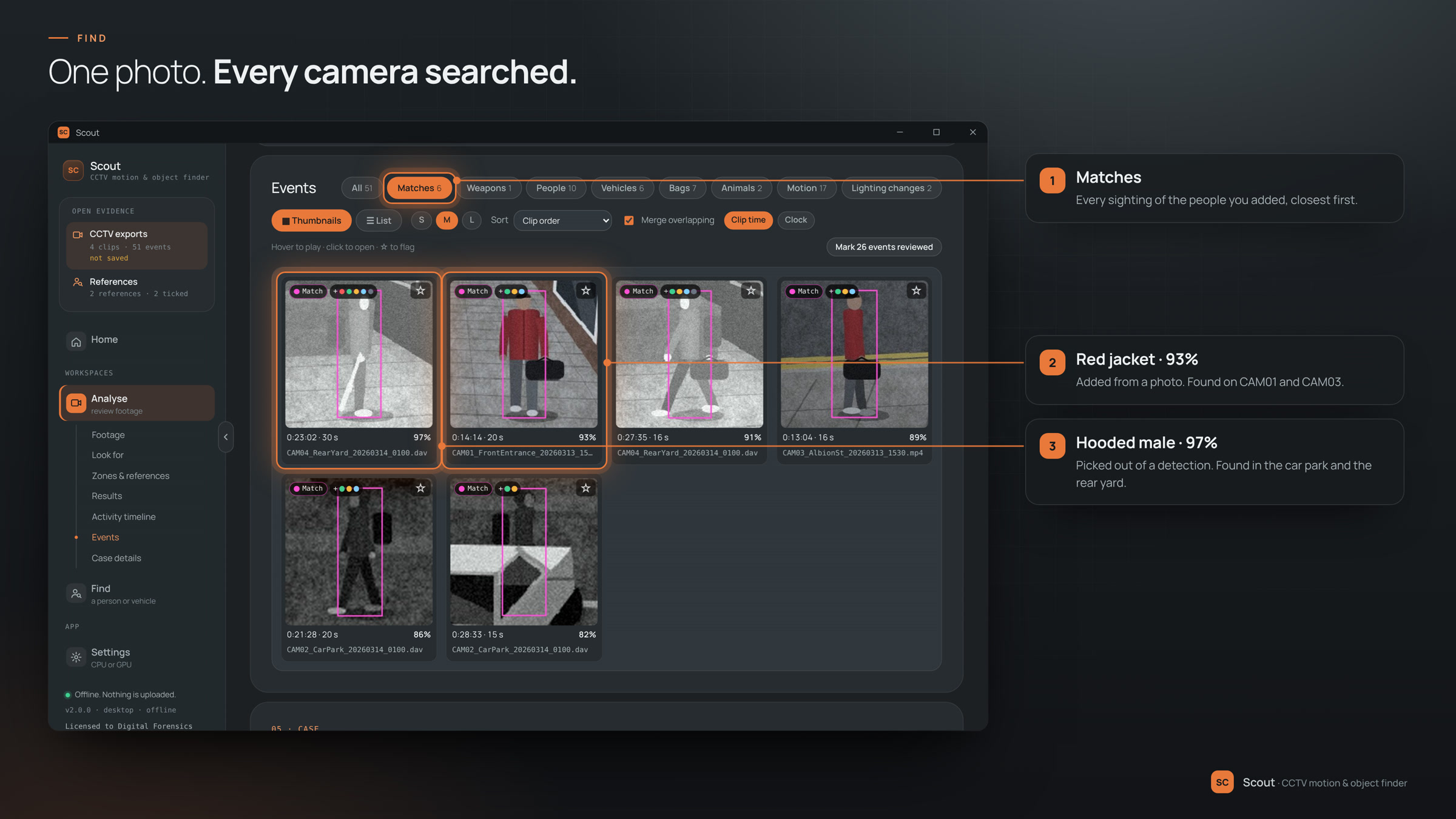
Give Scout a photo of the person or vehicle you're after, or pick them out of any detection, and it searches every clip for them. The closest matches come first, across every camera.

  1. Add a photo… a still, a screenshot or a crop from another camera. Or open a detection and choose Use as reference.
  2. Click the person to look for Scout finds the people and objects in the photo for you.
  3. Add reference kept in the library between sessions.
  4. Analyse again then the Matches filter shows every sighting, closest first.

04 · Report

Hand over a report, not a hard drive.

Save the case to one file and pick it up later, or produce a self-contained HTML report with the snapshots, heatmaps, flagged events and matches built in, and a CSV of every event.

  1. Save case one .scout file keeps every result, snapshot, flag and reference.
  2. View report or Save HTML to hand it on. Nothing to install to open it.
  3. Export CSV every event, with clip and clock times, for a spreadsheet.

On screen

click to enlarge
Results: matches, weapons and every kind of event counted on one screen, with the activity timeline below
Results: everything found, counted
Analyse: choose the footage, tick what to look for and pick Quick, Balanced or Thorough
Analyse: three choices, then Scout does the watching
Events as thumbnails: each tile a close-up of the person, vehicle or bag found, with filters by type and flags
Events: every detection as a close-up
The event viewer: a weapon detection on the rear yard camera with its clock time, length and confidence
Event viewer: see exactly what Scout saw
Find: matches for two people across all four cameras, closest first
Find: one photo, every camera searched

At a glance

Platform
Windows 10 and 11
Formats
MP4, AVI, MOV, MKV, ASF, WMV, TS, DAV, H.264, MPG and more
Outputs
HTML report with snapshots, CSV of events, saved case file
Works offline
Yes, with the detection models included
Pricing
From £995, then £250 a year

Good to know

  • An NVIDIA graphics card speeds up detection. Without one, everything runs on the CPU.
  • Detections show you where to look. Always watch the footage itself before relying on an event.

Scout is in development

It isn't on general sale yet. Request early access to use it on your own material before release, report what works and what doesn't, and help shape the finished version. Early-access users get launch pricing locked in.

Planned pricing and licensing →

Single workstation

£995

then £250 a year from year two

Unit licence

£3,500

then £875 a year from year two

Planned launch prices, excluding VAT. A unit licence covers every workstation in one force's forensic unit.

  • Try it before release on your own material
  • Direct line to the developer for feedback
  • Launch pricing locked in for early-access users